JSON Split
JSON Split / Chunker
The JSON Split tool breaks large JSON arrays into smaller chunks so they are easier to process, upload, or analyze. This is especially useful for large datasets, API responses, and data imports where systems have size limits. By splitting a big array into manageable pieces, you can reduce memory usage, speed up parsing, and avoid request limits or timeouts. The tool runs locally in your browser, so your data stays private.
Chunking JSON is a common workflow in data pipelines and analytics. Instead of handling a 50 MB JSON array, you can split it into 500 smaller parts and process them sequentially. This approach is more reliable for browser-based tools and prevents out-of-memory errors in scripts.
What the JSON Split tool does
- Splits a JSON array into multiple smaller arrays.
- Lets you choose chunk size or number of chunks.
- Preserves item order across chunks.
- Produces valid JSON for each chunk.
How to use the JSON splitter
- Paste a JSON array into the left editor.
- Select a chunk size (items per chunk) or number of chunks.
- Click Split to generate output.
- Copy or download the chunks.
Example: split into chunks
Input JSON array:
[
  { "id": 1 }, { "id": 2 }, { "id": 3 }, { "id": 4 }, { "id": 5 }
]
Chunk size: 2
Output chunks:
Chunk 1:
[
  { "id": 1 },
  { "id": 2 }
]

Chunk 2:
[
  { "id": 3 },
  { "id": 4 }
]

Chunk 3:
[
  { "id": 5 }
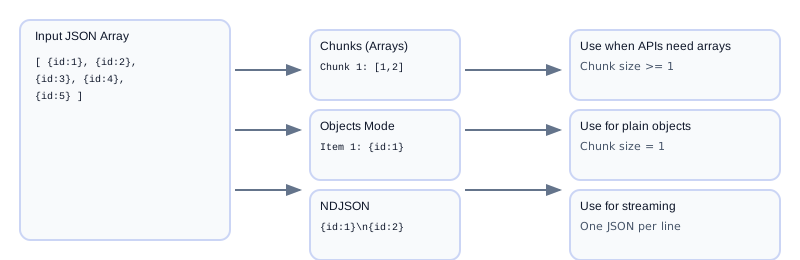
]
Example: one object per chunk (Objects mode)
Chunk size: 1 and Output: Objects (one per chunk)
Item 1:
{ "id": 1 }

Item 2:
{ "id": 2 }

Item 3:
{ "id": 3 }
Split vs NDJSON
JSON Split keeps array format but divides it into smaller arrays. NDJSON converts each record to its own line for streaming. Use split when your system expects JSON arrays. Use JSON NDJSON for line-based pipelines.
Objects mode is ideal when you want one standalone object per chunk without array brackets. It requires a chunk size of 1.
Common errors and fixes
- Input is not an array: The splitter works on arrays. Wrap objects in an array or use a different tool.
- Invalid JSON: Validate input with JSON Validator before splitting.
- Chunk size too small: Very small chunks can create too many files. Increase chunk size if needed.
- Large arrays slow: Very large arrays may be slow in the browser. Consider splitting in batches.
- Uneven chunks: The last chunk may have fewer items. This is expected behavior.
Best practices for chunking JSON
- Choose chunk size based on system limits (API, file size, memory).
- Keep chunks small enough for quick processing but large enough to reduce overhead.
- Preserve metadata separately if each chunk needs context.
- Validate each chunk if it will be processed independently.
- Use JSON Formatter for readability.
Choosing the right chunk size
Chunk size depends on your environment. If an API limit is 1 MB, calculate how many records fit within that size. If you are using a browser-based tool, smaller chunks reduce memory usage and improve responsiveness. For database imports, choose chunk sizes that fit within transaction limits and reduce lock contention.
As a rule of thumb, start with 500–2,000 records per chunk for moderate-sized objects, then adjust based on performance metrics. Always measure with real data to find the sweet spot.
Naming and organizing chunks
If you export chunks as separate files, use a clear naming convention such as data-part-001.json, data-part-002.json, and so on. This makes it easier to process them in order and recombine later.
For automated pipelines, store chunk metadata (like total count, chunk size, and source) alongside each file so you can reassemble or audit the dataset easily.
Use cases
API uploads: Split large arrays into multiple requests.
Data imports: Load chunks into databases without timeouts.
Analytics: Process smaller batches for faster queries.
Browser tools: Avoid memory issues in front-end apps.
Workflow checklist
- Validate JSON and confirm it is an array.
- Pick a chunk size based on your environment limits.
- Split the array and review each chunk.
- Store or process chunks in sequence.
- Recombine later if needed.
Recombining chunks
To recombine, concatenate the arrays in order or merge them into a single array. If chunks were processed independently, ensure no records were duplicated or lost. For strict workflows, track chunk indexes and total counts to verify integrity.
For automation, store chunk metadata such as total chunks, chunk size, and original file name. This makes it easier to audit and reassemble datasets later.
If you are uploading chunks to an API, keep the same ordering and include a chunk index so the server can reassemble correctly.
For long-running jobs, log each chunk as it is processed so you can resume from the last successful chunk.
This keeps large migrations resilient and easier to debug.
FAQs
Does splitting change my data?
No. Items are preserved in the same order; only the grouping changes.
Can I split nested arrays?
This tool splits only the top-level array. Flatten or restructure your JSON if needed.
Is my JSON uploaded?
No. All processing runs locally in your browser.
Can I rejoin chunks later?
Yes. Combine chunks into a single array to restore the original data.
What if my array is huge?
Split into larger chunks first, then refine if needed. Very large arrays may require scripts.
Does it work with NDJSON?
NDJSON is line-based; convert to a JSON array first if you want to split into arrays.
How do I get objects without [ ] around them?
Choose Output: Objects (one per chunk) and set chunk size to 1.
Why do I see [ ] around each item?
In Chunked JSON Arrays mode, each chunk is an array. Use Objects or NDJSON to avoid brackets.
Can I get a single JSON array of chunks?
Yes. Choose Output: Single JSON (Array of Arrays) for a valid JSON payload.
How do I choose chunk size?
Start with limits from your API or storage system, then adjust based on performance.
Can I split for CSV export?
Yes. Split first, then convert each chunk using JSON to CSV.
Can I split by size instead of item count?
This tool uses item count. If you need size-based chunks, use a script with size checks.
Does splitting affect ordering?
No. Items stay in the same order across chunks.
Can I split by date or value ranges?
This tool splits by count. For value-based splits, use a script or transform first.
Should I compress chunks?
Compression can reduce storage and transfer size, especially for large arrays.
Can I convert chunks to NDJSON?
Yes. Convert each chunk with JSON NDJSON for line-based processing.
Keyword‑targeted phrases
- split json array
- json chunker
- split large json
- json chunk size
- split json to ndjson
Related workflows
- Clean malformed arrays first with json validator.
- Apply field rules before chunking using json schema validator.
- After chunking, export batches with json to excel or json to csv converter.
- Need reverse import? Rebuild objects from sheets using csv to json converter.
Related tools: JSON NDJSON, JSON Minifier, JSON Formatter, JSON to CSV, JSON Compare